
Following and shipping orders
The states of an order, shipping, tracking and the private note.
Votre site → Boutique → Commandes (Your site → Shop → Orders)
Six states, and what they mean
The state of an order says what remains to be done, and nothing else.
- Payment in progress: the buyer has left their details but has not paid.
- To prepare: the money is in, the order is waiting for you.
- Fulfilled: you have shipped it, or told the buyer in the case of a file.
- Cancelled: never taken, stopped before payment.
- Refunded: the money has gone back to the buyer.
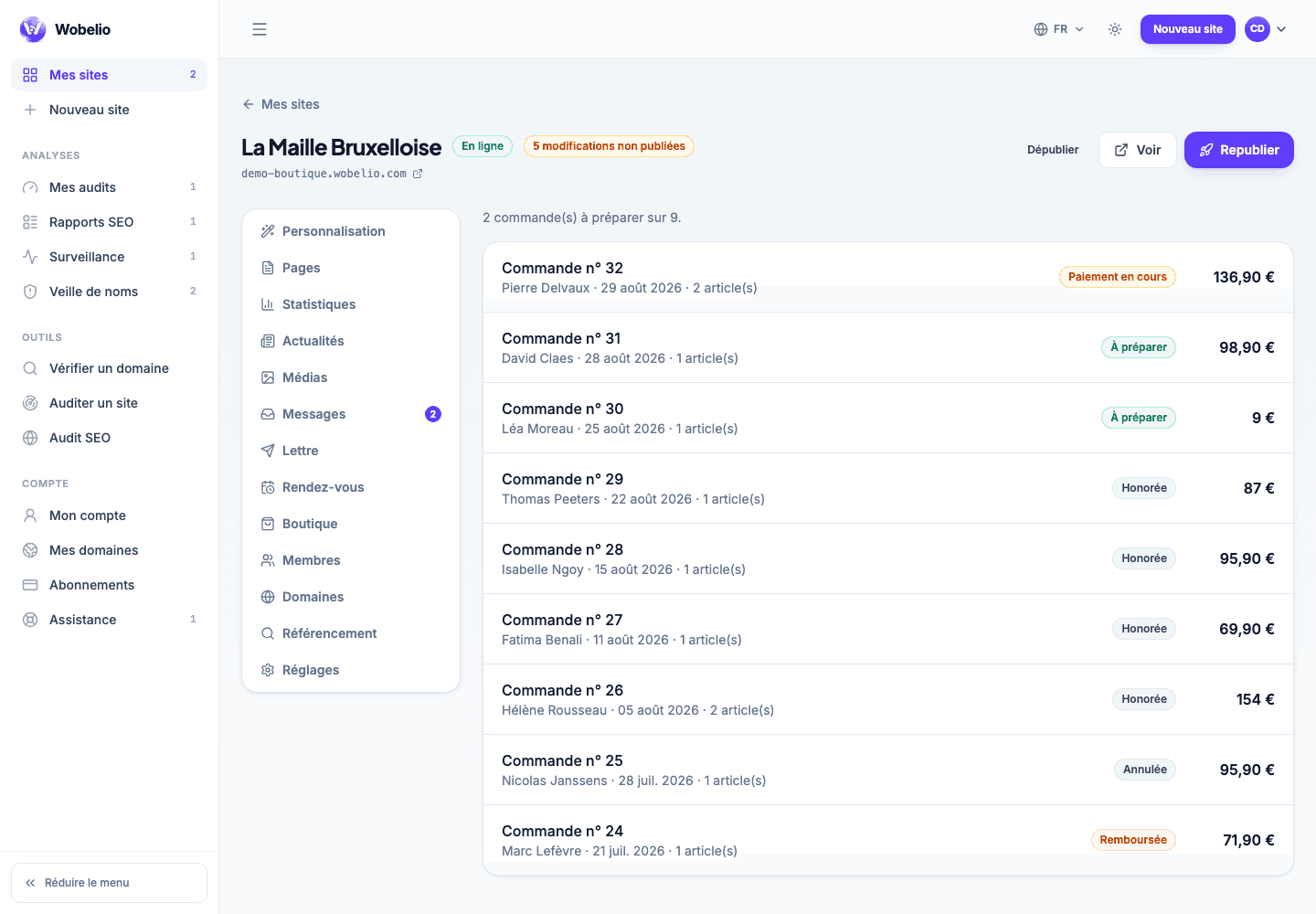
The stock alert is visible from the list
It is the one situation calling for action without delay: the money is already taken and you have sold what you no longer have. The row concerned carries a signal in the list, before you even open the record.
Shipping
The record of a paid order offers « Marquer comme expédiée » (Mark as shipped) — or « Prévenir l’acheteur » (Tell the buyer) when it contains only files. The buyer then receives an e-mail with the number and the tracking link you enter here; both are optional.
Your note, and cancelling
The seller’s note is for you alone: the buyer never sees it. Cancelling is only offered on an order that was never paid; beyond that, what gives the money back is a refund, and it is made from your Stripe dashboard.
Cet article ne répond pas à votre cas ? Écrivez-nous depuis votre espace.